
Free while we start with schools
For flight schools
See every plan before the lesson, and every flight after it.
Students plan in the app and send the plan to their instructor. The school area shows the plan, the briefing the server logged, how the flight went and the school’s safety reports, so instructor and student look at the same record.
Free while we work with the first schools. A training and situational awareness aid, not certified for navigation. Screens show a sample school.
What it does
What the instructor sees before the lesson, and after it
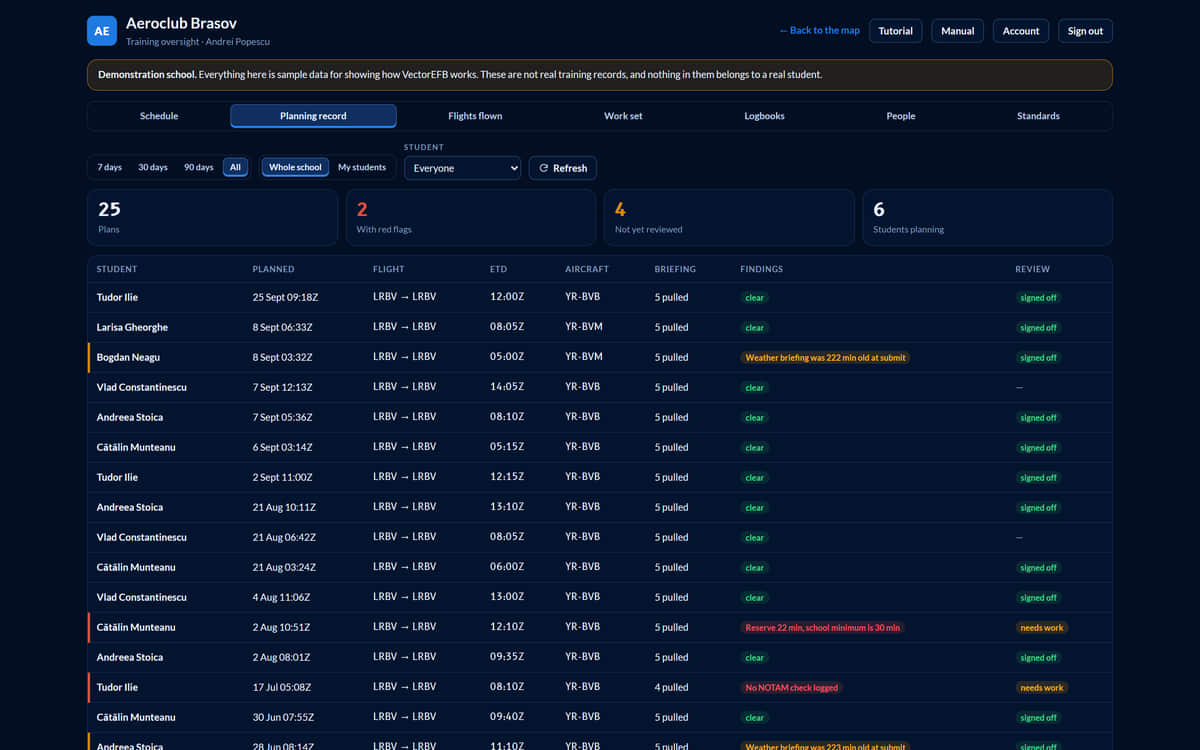
Students plan in the normal app and send the plan to their instructor. The school area shows the plan, the briefing the server logged, how the flight went, and the school’s safety reports. The screens below show a sample school.
01 Schedule
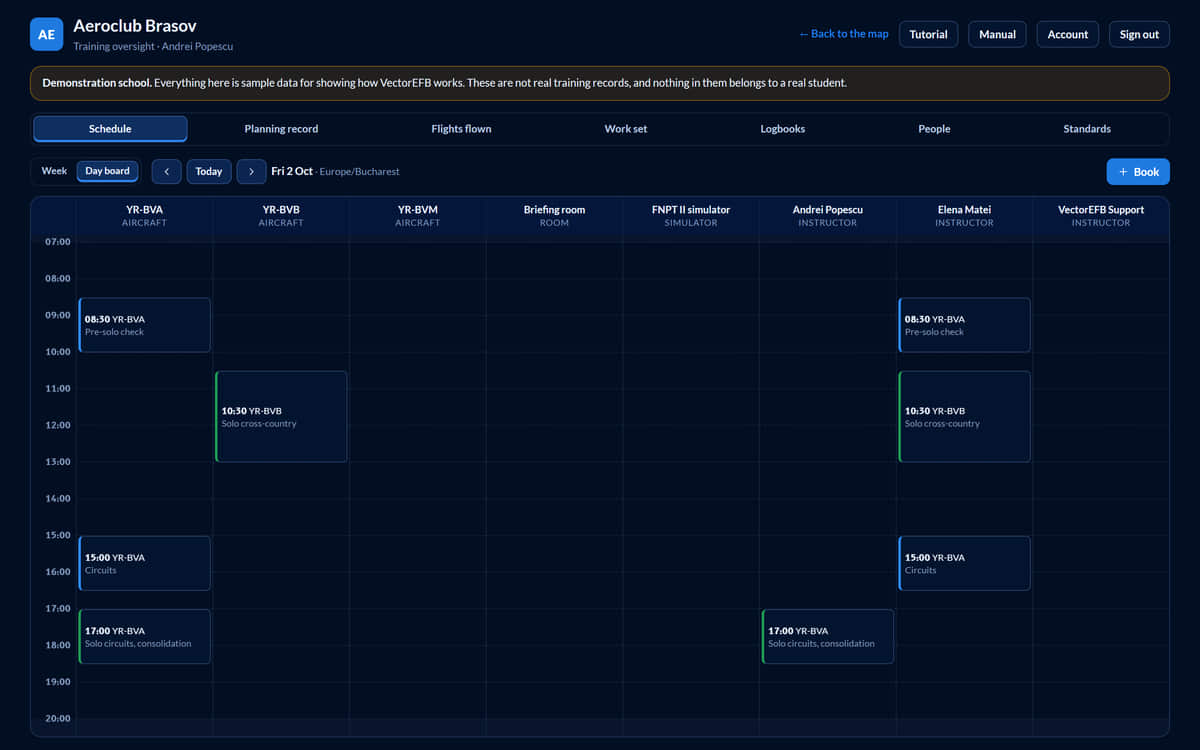
One board for aircraft, rooms and instructors
The day board has a column for each aeroplane, briefing room, simulator and instructor. A booking is checked against all of them at once, so nobody is in two places and no aeroplane is in two details. An aeroplane in maintenance or marked out of service cannot be booked. Times show in the school’s timezone.
- Lesson, solo, ground school, simulator, skill test, maintenance
- Back-to-back bookings are allowed
02 Plan review
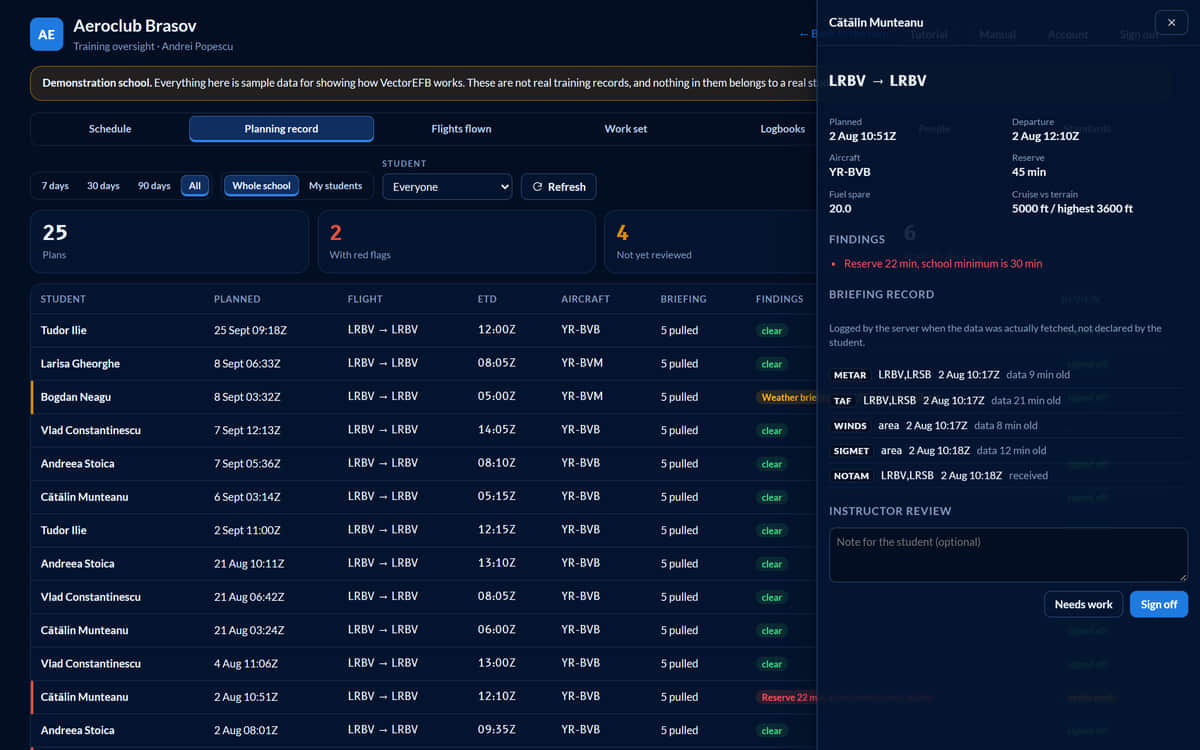
The evidence behind a plan
Every submitted plan is listed with its flags and review status, measured against the school’s own minimums. Open one for the route, the fuel and terrain figures and the briefings the server logged: what was asked for, when, and how old the data was. Sign the plan off, or mark it as needing work with a note the student will see.
- Reserve 22 min, school minimum is 30 min
- Weather briefing was 222 min old at submit
- The times are the server’s, so a student’s device cannot backdate them
A compliance record, not tamper-proof evidence. It shows who prepared, not who understood.
03 Replay
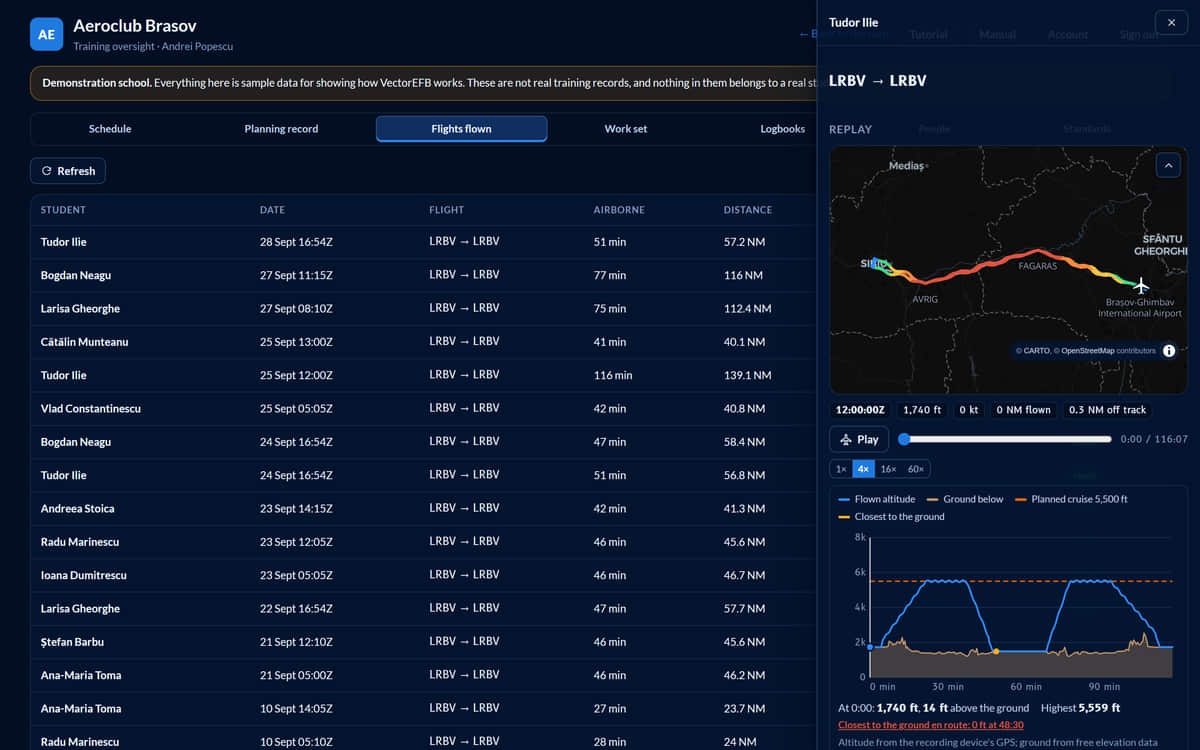
Fly the lesson back
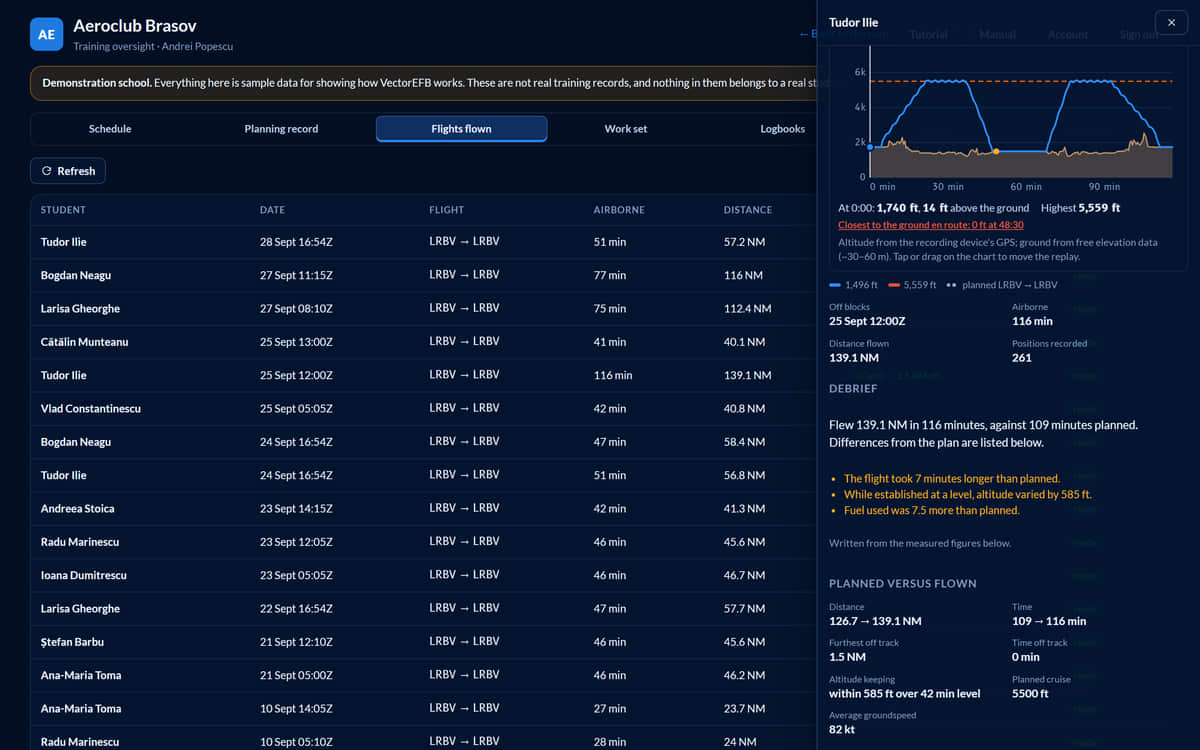
Many light training aeroplanes broadcast no position, so the student’s phone or tablet records the track from its own GPS. The replay draws the track coloured by altitude, and plots the altitude flown against the planned cruise level and the ground beneath it. Play it at 1x, 4x, 16x or 60x.
04 Debrief
Planned against flown
When the flight is sent, it is compared with the plan: time, distance, the furthest off track and for how long, how well the cruise level was held, average groundspeed, fuel and any planned waypoint not reached. The written debrief is composed by rules from those measured figures, and no outside service sees the flight, so the words cannot disagree with the numbers.
05 Logbook
A logbook the recording fills in
The logbook is laid out with the columns of an EASA pilot logbook. A recorded flight fills in what it can prove, including night time worked out from the track against civil twilight. It does not guess who was in command, or what was dual or instrument time: the pilot enters those, and the pilot’s correction always wins. Export as CSV or print.
A convenience copy. The official logbook remains the pilot’s responsibility.

06 Standards and fleet
The school sets the numbers
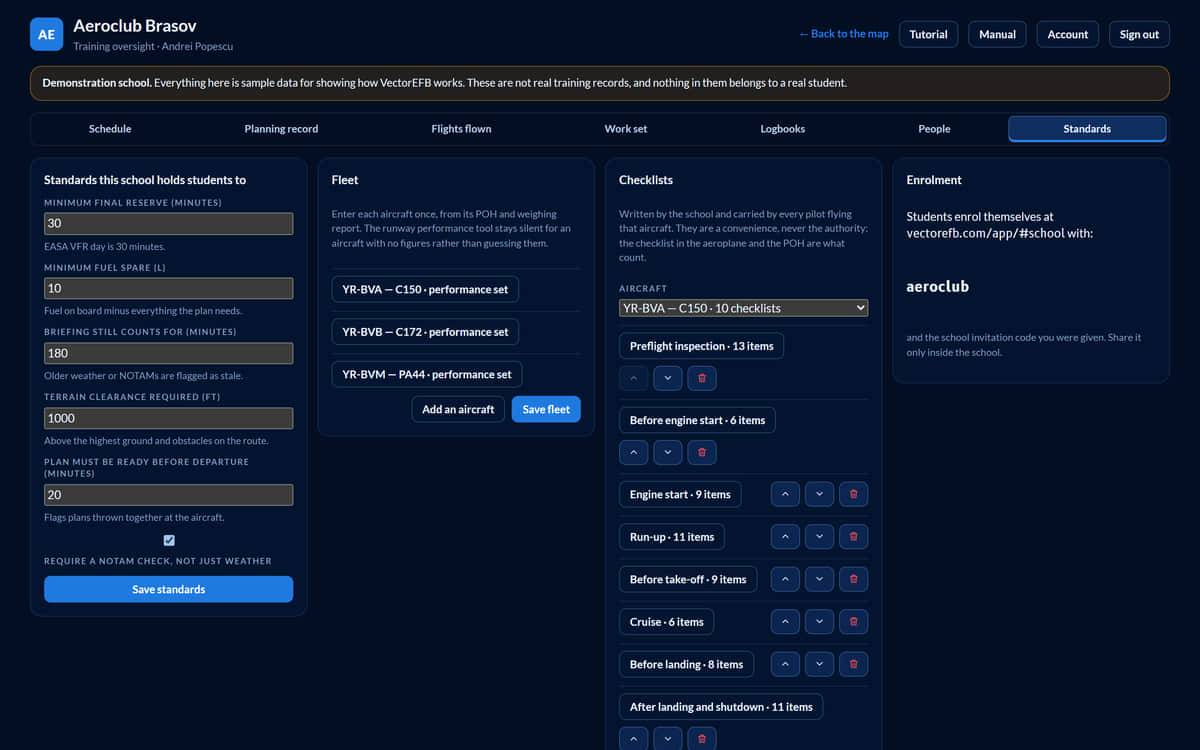
Minimum final reserve, how long a briefing stays valid, terrain clearance, how far ahead of departure a plan must be ready, and minimum fuel spare are the school’s own. Each aeroplane gets its performance figures from its POH and its own checklists, written by the school. Two schools can hold different standards.
- Three aircraft in the sample school: Cessna 150, Cessna 172, Piper PA-44
07 Safety reports
Safety reports, from first report to closure
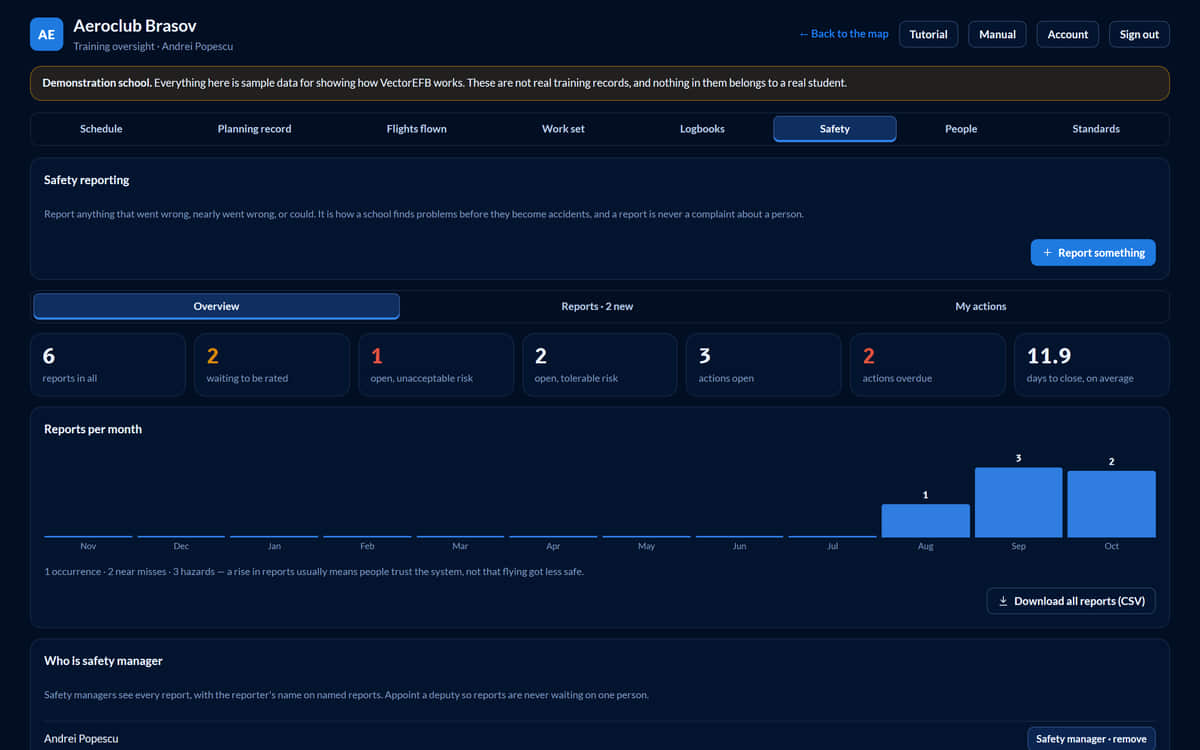
Anyone at the school can report an occurrence, a near miss or a hazard, with their name or without. The safety manager rates each report on a severity-by-likelihood matrix, gives follow-up actions to named instructors with dates, and closes it with a note the reporter reads. Every report downloads as a spreadsheet for a safety review.
- A report filed without a name stores no name at all, so it cannot be traced back to anyone
- The risk bands are a common default. Check them against the school’s own safety manual.
The screens show a sample school with invented people, aircraft and flights. About the screens.
Why choose it
Why schools choose VectorEFB
One school area
Scheduling, plan review, flight replay, debriefs, logbooks, standards and safety reports sit in one place, with the pilot app students already use for planning.
Your own minimums
Each school sets its own final reserve, briefing validity, terrain clearance and plan lead time, and every plan is measured against them. Two schools can hold different standards.
The evidence behind each plan
The server logs when weather was fetched and how old it was, so a student’s device cannot backdate a briefing. A compliance record, not tamper-proof evidence.
Flights you can replay
The student’s own phone or tablet records the track, and the replay and debrief compare it with the plan in measured figures.
Safety reporting built in
Anyone can report with or without a name. A report filed without a name stores no name at all. The safety manager sees every report, and a named reporter sees their own.
Your data stays your responsibility
For a school’s students the school is the data controller and VectorEFB the processor. Students acknowledge what their instructor can see before anything is shared, and a data processing agreement is available on request.
How it starts
From first message to first lesson
- You ask for an account. Use the form below with your school’s name.
- We set the school up. We create the school code, load your fleet and standards, and take your instructors through the dashboard.
- Your people sign in. Instructors get their accounts, and students enrol themselves with the school’s invitation code.
Free while we work with the first schools. Prices will be agreed with each school before anything is billed.
Free while we start with schools
Request your school account
Tell us who you are and which school, and we will write to you about setting it up.
- Free while we work with the first schoolsPrices will be agreed with each school before anything is billed.
- We set up the school code, load your fleet and standards and take your instructors through the dashboard
- Students enrol themselves with the school’s invitation code
- A data processing agreement is available on request
- No ads
- No tracking cookies
- Reply by email
Request your school account
This is a request, not a sign-up: we reply by email to set your school up.
Thank you
We will write to about setting up your school: the school code, your fleet and standards, and a walk through the dashboard for your instructors.
Already set up? Sign in to your school
We use these details only to reply to you about your school. See the privacy notice.
Already set up? Sign in to your school
For training and situational awareness only. Not certified for navigation. Always use official charts, the AIP, NOTAMs and a proper weather briefing for real flights.
Screens on this page show a sample school with invented data. Data sources and known limits.